Early dental care is important to promote healthy teeth. This article addresses some dental care issues of children and provides guidance for preventing tooth development problems. Most children have their first tooth erupt sometime between the ages of 6 to 12 months. During this time their gums are sore, tender and sometimes are still irritable up until the age of 3. To help soothe your child’s sore gums, you can rub them gently with a clean finger, the back of a cold spoon, or a cold, wet cloth. Avoid teething biscuits–they contain sugar that can harm baby teeth. Instead try teething rings which work well.
 Pediatric dentist examining a little boys teeth in the dentists chair at the dental clinic
Dental Care Tip: Monitor your baby’s teeth. It is important to monitor your baby’s teeth for signs of baby bottle decay while your baby is teething. Every two weeks examine the teeth checking for dull spots (whiter than the tooth) or lines, especially on the inside or the tongue side. Decay can be caused by leaving a bottle containing anything other than water in an infant’s mouth while sleeping. This form of decay is caused by sugar in the liquid combining with the bacteria found in dental plaque. Together they form acids that attack the enamel of the tooth. For about 20 minutes after each time a child drinks liquids containing sugar, acid attacks the teeth. During sleep, the saliva flow significantly decreases and liquids pool around the child’s teeth for long periods, covering the teeth in acids.
Infant’s New Teeth
The primary, or “baby,” teeth play a crucial role in dental development. Without them, a child cannot chew food properly and has difficulty speaking clearly. Primary teeth are vital to development of the jaws and for guiding the permanent (secondary) teeth into place when they replace the primary teeth around age 6.
A Child’s First Dental Visit
Dental Care Tip: Schedule First Dental Appointment Around First Birthday. Around a child’s first birthday his/her first dental appointment should be scheduled. During the first visit the most important part is becoming comfortable with and getting to know your doctor and your doctor’s staff. Having a pleasant and comfortable first visit helps build trust and puts the child at ease during future visits. Having some anxiety is normal and children should be encouraged to discuss any fears that they may have.
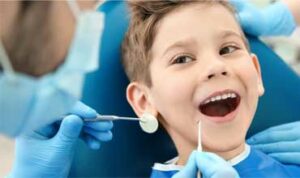 Primary Teeth Are Important
There are several reasons why Primary teeth are important. Foremost, good teeth allow a child to eat and maintain good nutrition. Healthy teeth also allow for clear pronunciation and speech. The positive self-image that having healthy teeth gives a child is immeasurable. Infants that are missing primary teeth or lose primary teeth prematurely may need a space maintainer, which is a device used to hold open the natural space, as primary teeth are what guide the permanent teeth into place. The teeth can tilt toward the empty space(s), without a maintainer, causing the permanent teeth to come in crooked. Always mention missing teeth to your family’s dentist. The way your child cares for their primary teeth plays a crucial role in how he/she treats permanent teeth. Regular care and dental checkups are needed for children, just as they are for adults, as both are equally susceptible to gum problems and plaque.
Good Diet and Healthy Teeth
Dental Care Tip: Healthy Food Help Develop Healthy Teeth. A healthy, well-balanced diet is required for the teeth, bones, and soft tissue of the mouth. Eating a variety of foods from the five food groups helps minimize (and avoid) cavities as well as other dental problems. Children should only be given healthy foods as a snack such as vegetables, low-fat yogurt, and cheeses, which promote strong teeth as most of the snacks that children commonly eat cause cavities. Encourage your children to drink water between and after meals instead of sodas and sugary drinks and also to brush their teeth after snacks and each meal. More on this website
 At this point things might get a little tricky for the novice, but I have faith in you so pay close attention and we’ll get you through the next step. Inside the control panel on your web host will be a link to MySQL Databases. WordPress is built on a SQL database – every post, title, comment, category and tag is stored into a record in this database and that text is dynamically called upon via php code to render the blog (don’t worry if that didn’t make much sense, sometimes I get carried away). So now you are within the MySQL section of your control panel on your web host — now it’s time to create a database. You will need to remember the name of the database, the username and the password. This information will be necessary in the next step of the process.